AI operator

An AI operator for every solar site.

It reads the plant every few minutes, tells you what changed in Telegram and on the dashboard, answers questions in plain language, and changes nothing until a person confirms.

SCADAAlertsStringsForecastsWork ordersReads the plantevery few minutesProposes an actionpower limit · alert ackA person confirms✅ Confirm ❌ DeclineSCADA executesaudited command log

The DYNVOLT AI operator is a per-site assistant that reads the same SCADA data, alerts, strings, forecasts and work orders as the plant team, checks the plant every few minutes, and reports in Telegram and on the dashboard. Its write access is off by default; when enabled, its two actions (a power limit and acknowledging an alert) each need a person to confirm.

It reports where your team already is.

A string that stays below its neighbours, an inverter tripping on insulation, a transformer running warm, a sensor that stopped reporting. The operator explains what it sees, what it ruled out, and what it suggests, in a Telegram chat for the site.

Reply with a question and it answers from the plant's own data. When nothing changed, it stays quiet.

DYNVOLT Operatorbot · Solar Park A
Today
Example conversation. Plant and string names are illustrative.

Or ask it in the dashboard.

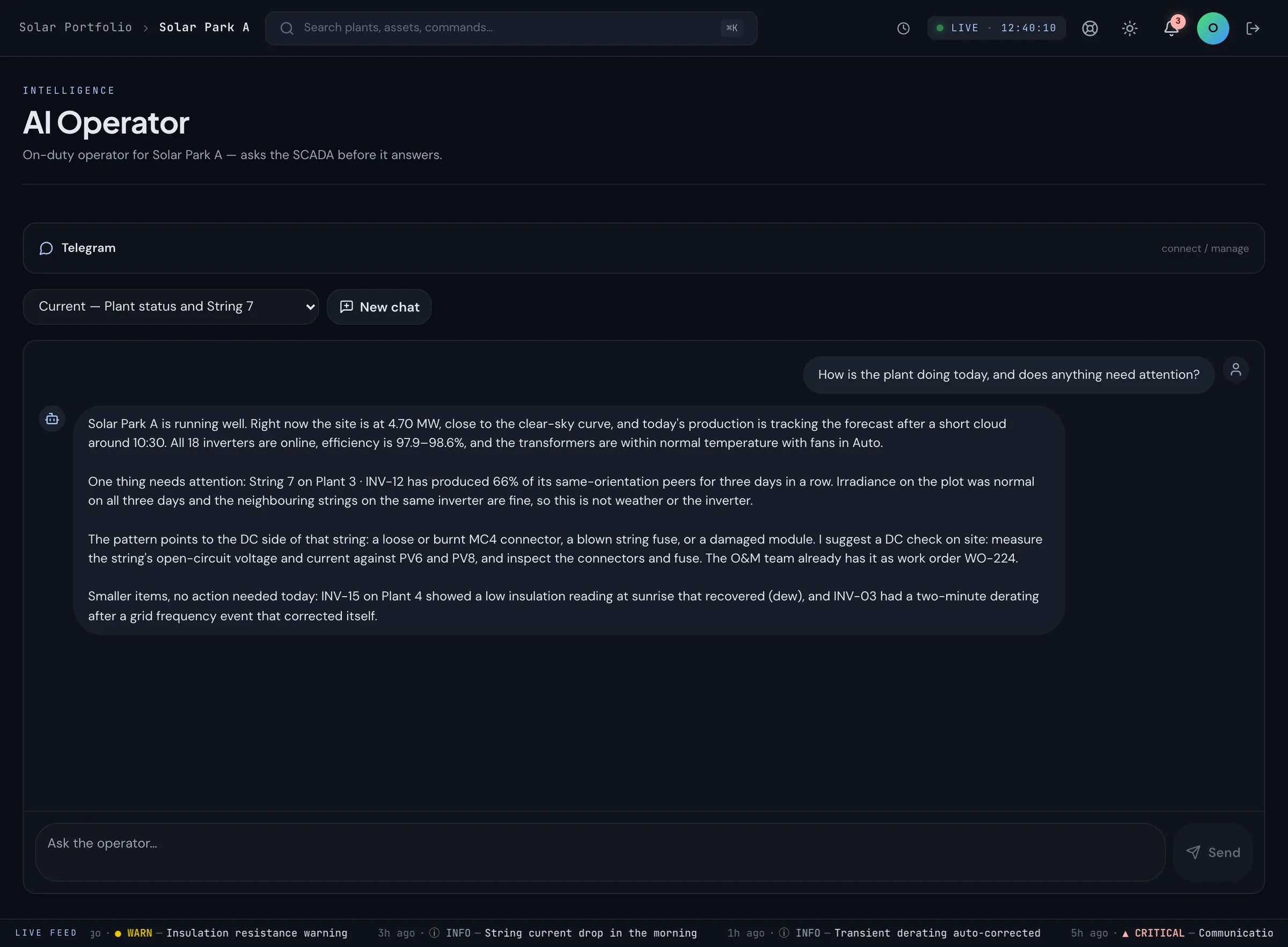
The same operator answers in the owner console, with the plant's data behind every sentence.

DYNVOLT AI operator chat in the owner console: the operator reports a string at 66% of its peers and suggests a DC check

What it reads.

Everything the plant team can see for the sites it is switched on for, and nothing else.

  • SCADA telemetry
  • Alerts
  • Inverters and strings
  • I-V curves
  • Weather and sensor nodes
  • Production forecasts
  • Earnings
  • O&M work orders
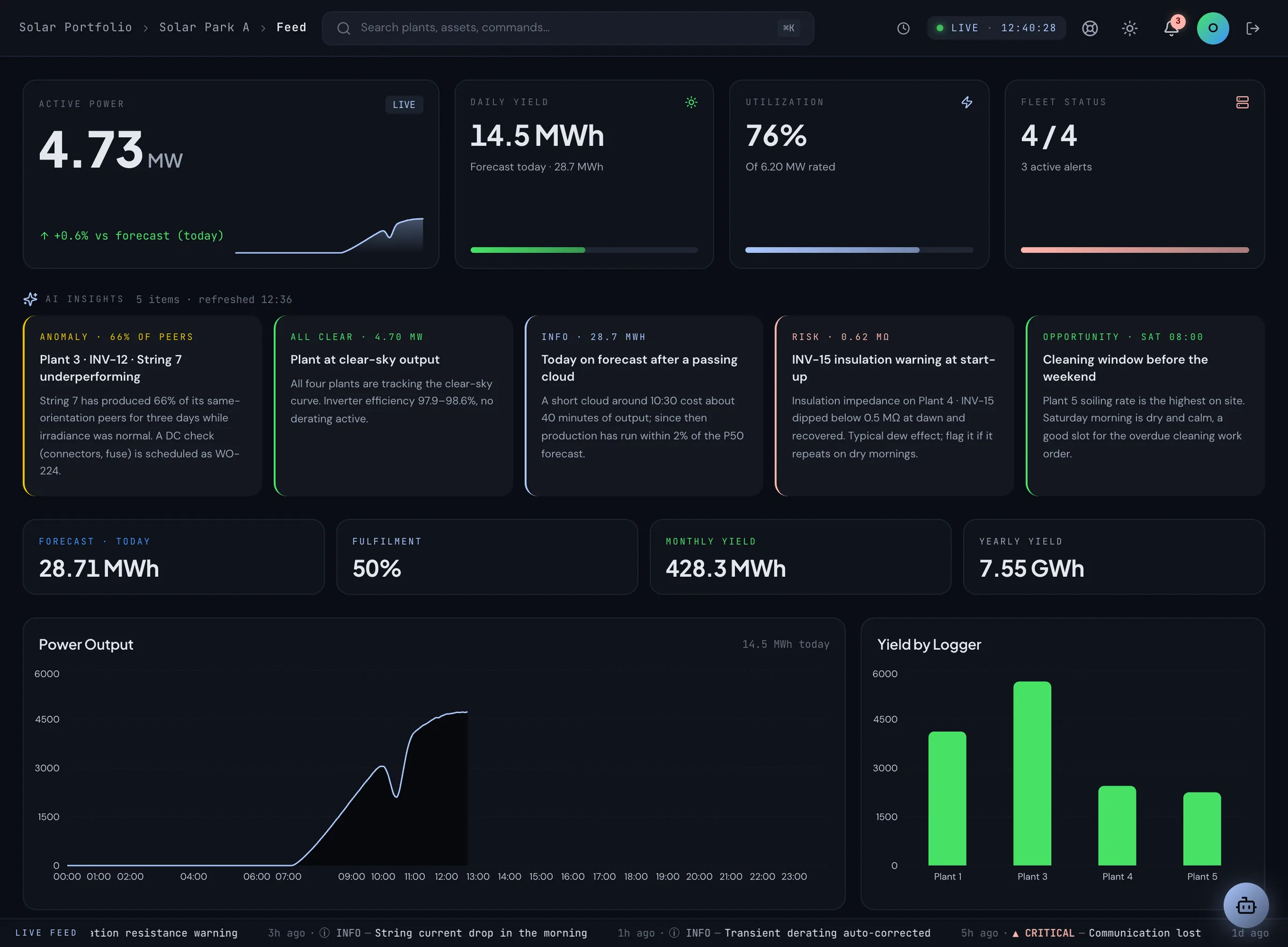
DYNVOLT dashboard feed: the AI operator's insight cards above live plant power and yield

The dashboard feed. The operator's notes sit above live power and yield.

What it can change, and how.

Nothing, by default. If you enable actions for a site, the operator can propose two things: a power limit and acknowledging an alert. Every proposal goes through the same four steps.

  1. ProposesThe model suggests one of the actions enabled for the site, with its reason.
  2. AllowlistCode checks the proposal against the site's allowlist. Anything else is dropped.
  3. A person confirmsThe proposal arrives as a button in Telegram or the dashboard. Nothing runs until someone taps Confirm.
  4. SCADA executesThe confirmed action runs through the SCADA's own audited command endpoint, under the AI's service account.

It cannot place or change market bids, create or close work orders, or change settings. Messages only go to the Telegram chats configured for the site. Read more about data ownership and audit on the trust page.

FAQ

AI operator: frequently asked

Can't find what you're looking for? Talk to our team →

What does the AI operator read?
The same data as your team: SCADA telemetry, alerts, inverters, strings, I-V curves, weather and sensor nodes, production forecasts, earnings and O&M work orders, for the sites it is switched on for.
How often does it check the plant?
Every few minutes, and immediately when a new alert arrives. It writes what changed to the dashboard feed and to Telegram, and stays quiet when nothing did.
Can I ask it questions?
Yes, in plain language, in the dashboard chat or in Telegram. It answers from the plant's own data and says when the data cannot answer the question.
What can it change?
Nothing by default. If you enable actions for a site, it can propose two things: a power limit and acknowledging an alert. Each proposal is checked against an allowlist for that site, then a person taps Confirm or Decline. Confirmed actions run through the SCADA's own audited command endpoint and show up in the command log under the AI's service account.
What can it never do?
Place or change market bids, create or close work orders, change settings, or act without a person confirming. Messages only go to the Telegram chats configured for the site; the model cannot choose a recipient.
Is it per site?
Yes. The AI operator is switched on per site, and read access follows the roles of the people it serves.

See the operator on a live plant.

In a demo we switch it on for one of our plants and ask it about yesterday.

Request a demoThe SCADA it reads